
The hardware and bandwidth for this mirror is donated by METANET, the Webhosting and Full Service-Cloud Provider.
If you wish to report a bug, or if you are interested in having us mirror your free-software or open-source project, please feel free to contact us at mirror[@]metanet.ch.

ggauto is an opinionated ggplot2
extension package to automatically choose the best chart type and
styling, based on the types and values in the data. It’s based on the
following three principles:
Warning! If you don’t like some (or all) of the opinionated choices in this package, make a fork and create your own version. Bug reports and/or fixes are extremely welcome for things that don’t work, but stylistic changes that are personal preferences will not be addressed.
This package is built on the philosophy that data wrangling and plotting are separate parts of the process of building a chart. Tasks like ordering data, converting to correct date formats, or computing summary statistics should generally be performed before passing into a plotting function.
In terms of styling, the defaults differ from ggplot2 in
the following ways:
y axis, when 0 is included in
the data (for some chart types), to enable comparison.Install from CRAN:
install.packages("ggauto")You can install the development version of ggauto from
GitHub with:
# install.packages("pak")
pak::pak("nrennie/ggauto")
Load the package:
library(ggauto)The available data types are based on the scale_x/y_
options in ggplot2:
This package assumes that you have correctly pre-processed your data
i.e. is based on the assumption that you understand what the columns in
your data are before you try to plot it. This means that if, for
example, you have data for years encoded as numeric 2021 or
"2021", you would convert it to a date object before
plotting. The package also assumes that all data is in long format.
| var1 | var2 | var3 | Chart Type | Implemented |
|---|---|---|---|---|
| Continuous | - | - | Raincloud plot | Yes |
| Continuous | Continuous | - | Scatter plot | Yes |
| Continuous | Continuous | Discrete | Scatter plot with coloured shapes | Yes |
| Discrete | - | - | Bar chart (showing count of categories) | Yes |
| Discrete | Continuous | - | Bar chart (if one value per category) or raincloud plot (if multiple values per category) | Yes |
| Discrete | Discrete | - | Heatmap (showing count of category combinations) | Yes |
| Discrete | Discrete | Continuous | Heatmap (showing continuous variable) | Yes |
| Date | Continuous | - | Line chart | Yes |
| Date | Continuous | Discrete | Line chart with coloured lines | Yes |
To use ggauto() simply pass in the data and the variable
names you wish to visualise. For example, using the mpg
data from ggplot2:
library(ggplot2)
mpg |>
  ggauto(displ)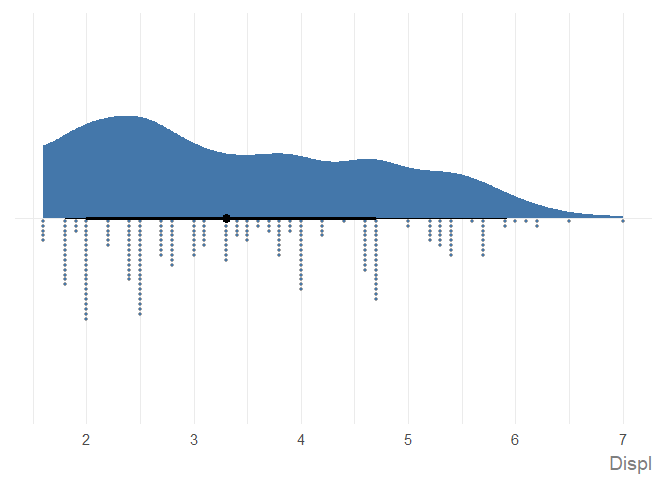
See the Examples vignette for more information, including different chart types, how to edit chart text, and different ways to pass in data.
These binaries (installable software) and packages are in development.
They may not be fully stable and should be used with caution. We make no claims about them.